
Set Up Your TV in Five Minutes
Always start with the chair, then arrange the rest of the room around it
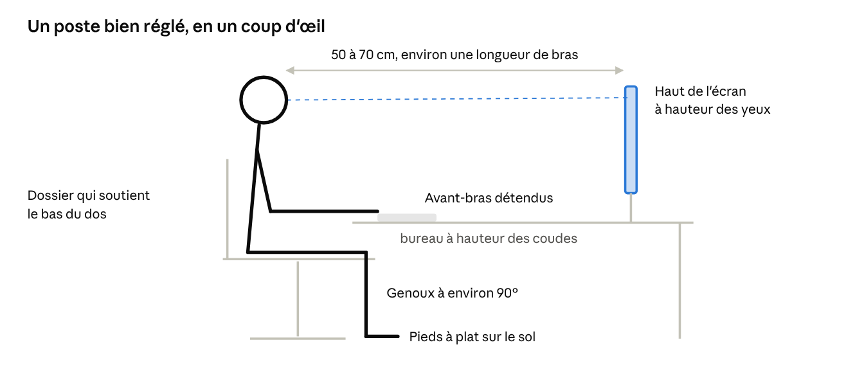
Computer Workstation · Key Guidelines, Side View
This list can be checked off each time there is a change in position or facility
The best way to adjust is to move
Even when seated comfortably, the body is not designed to remain motionless for hours on end. In 2015, a group of international experts published specific recommendations for office workers in the *British Journal of Sports Medicine*:
In the same vein, the French National Institute for Research and Safety (INRS) recommends taking active breaks, ideally every 30 minutes.
Here are a few easy-to-implement ideas:
With a sit-stand desk, the goal isn't to stand all day, butto alternate between sitting and standing.

Protecting Your Eyes
If eye strain, headaches, or blurred vision persist despite these adjustments, it’s a good idea to have your eyes checked by an ophthalmologist or optometrist. Glasses designed for computer work can sometimes make all the difference.
Working from Home and Laptops: Pitfalls to Avoid
Laptops are convenient, but they force you to choose between two poor postures: either the screen is too low and your neck bends, or the keyboard is too high and your shoulders tense up.
At home, the kitchen table and the sofa rarely make good workspaces. An adjustable chair, an external monitor, and a separate keyboard are often the most useful investments.

What the Law Says, and When to Seek Help
In Switzerland, employers are required to protect the health of their employees (Art. 6 of the Labor Act) and to design workstations in accordance with ergonomic principles (Arts. 2, 23, and 24 of the OLT 3). Adjusting a workstation is therefore a shared responsibility: the company provides adjustable furniture and equipment, and each employee adjusts them to fit their own needs.
For employees: If pain persists for several days despite these adjustments, or if you experience tingling or numbness in your hands, talk to your doctor and report it to your employer. Taking action early can prevent the discomfort from becoming chronic.
For employers: A job analysis conducted by an ergonomist or an occupational health professional helps pinpoint exactly what the problem is and avoid unnecessary purchases.
For more information, Suva offers a very comprehensive brochure: " Working at a Computer: Tips for Working Comfortably at the Computer " (reference 84021.F).
Sources
• Buckley, J. P., Hedge, A., Yates, T., et al. (2015). The sedentary office: an expert statement on the growing case for change toward better health and productivity. British Journal of Sports Medicine, 49(21), 1357.
• INRS. Computer Vision Syndrome: Risk Prevention, updated June 11, 2025.
• Canton of Valais. Recommendation: Ergonomics in the workplace.
• EPFL. Ergonomic recommendations for your office, which refers to the Suva brochure 84021.F.